Last updated: August 8, 2025
How to Update Page Background?
Table of Contents
If you look are demo there have a very light blue color background whihch is almost 5% shade of the primary blue accent color. If you want to keep the same color then you can follow the steps below.
- Open your page in Divi Builder.
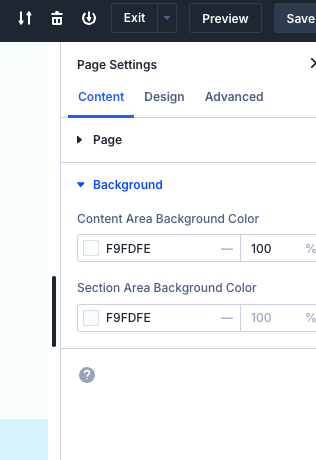
- Go to the page settings and find the background section.
- Change the background color
#f9fdfe(or any shade of the primary accent color you prefer). There have “Content Area Backgorund Color” and “Section Area Background Color”, you shoul update the both to get similar look like our demo. - Save the changes.