
Divi 5 Migration Services: Fast, Future-Proof Sites
Table of Contents
The release of Divi 5 marks one of the most significant milestones in the history of the Divi ecosystem.
Unlike previous updates that introduced new modules or design features, Divi 5 represents a complete architectural rebuild. Elegant Themes has redesigned the foundation of Divi to deliver faster performance, cleaner code output, better scalability, improved responsiveness, and a more modern development experience.
For website owners, agencies, and businesses that rely on Divi, this presents both an opportunity and a challenge.
The opportunity is obvious.
A properly migrated Divi 5 website can deliver:
| Benefit | What It Means |
|---|---|
| Faster Page Load Times | Pages load more quickly, creating a smoother experience for visitors. |
| Improved Core Web Vitals | Better performance metrics that can positively impact user experience and search visibility. |
| Better Mobile Responsiveness | Improved layout rendering and performance across smartphones and tablets. |
| Improved WooCommerce Compatibility | Enhanced support for modern WooCommerce features and future updates. |
| Easier Long-Term Maintenance | Cleaner code structure makes updates, troubleshooting, and ongoing management simpler. |
| Future-Ready Website Architecture | Built on a modern foundation designed to support future Divi enhancements and web technologies. |
The challenge is that migration is not always as simple as clicking an update button.
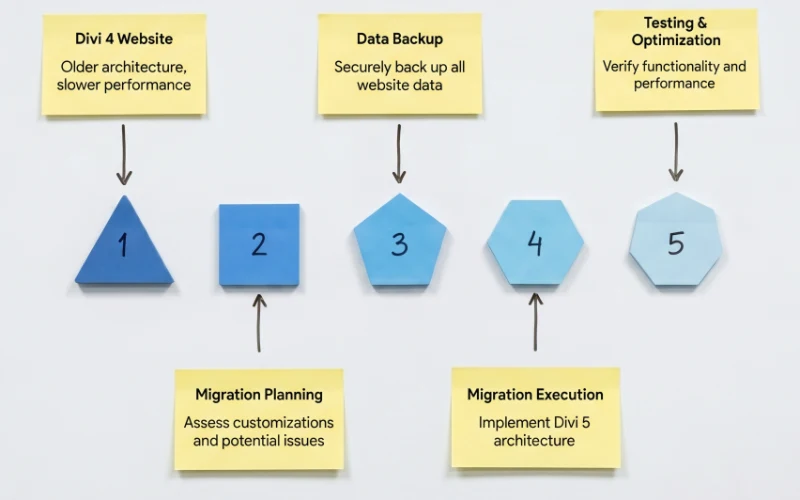
Custom CSS, child themes, third-party plugins, WooCommerce customizations, SVG assets, responsive layouts, and dynamic content can all introduce unexpected issues during migration. SVG issues are particularly common - see our SVG troubleshooting guide for solutions.
This is why many businesses choose to work with a Divi 5 Migration Expert rather than risking a live website upgrade.
At Divi Flow, we specialize in safe Divi 4 to Divi 5 migration services designed to protect your website while helping you take advantage of everything Divi 5 offers.
What Is Divi 5 and Why Is It Such a Big Deal?
For years, Divi has been one of the most popular WordPress page builders in the world.
Millions of websites rely on Divi for:
- Business websites
- Agency websites
- WooCommerce stores
- Membership sites
- Portfolio websites
- Educational platforms
- Landing pages
However, as WordPress evolved, the original Divi architecture began showing its age.
Divi 5 addresses this by rebuilding the platform from the ground up.
Instead of relying on older systems and legacy code, Divi 5 introduces:
1. A Modern Rendering Engine
The rendering engine is responsible for converting your visual builder layouts into live website code.
Divi 5 generates cleaner and more efficient HTML output, reducing unnecessary code and improving overall performance. Learn more about how this works in our Divi 5 performance guide.
2. Better Asset Loading
Older websites often load resources that aren’t actually needed.
Divi 5 improves asset management by loading only what is necessary for each page.
3. Improved Builder Performance
The visual builder itself is significantly faster and more responsive, making content editing easier for website owners and clients.
4. Native CSS Grid Support
Modern layouts are easier to create using CSS Grid.
Divi 5 introduces native CSS Grid functionality, allowing more advanced and responsive design possibilities. This is a significant improvement that we cover in detail in our Divi 5 CSS Grid layout guide.
5. Better Mobile Controls
Responsive design has become more important than ever.
Divi 5 introduces improved device-specific controls for:
- Typography
- Spacing
- Layouts
- Images
- Visibility settings
These controls are complemented by new aspect ratio controls and image presets that help maintain consistent layouts across devices.
The result is a stronger foundation for both users and developers.
Why Thousands of Website Owners Are Planning a Divi 5 Migration
If your current Divi website is running smoothly, it’s completely natural to wonder whether upgrading is even necessary.
After all, if nothing is broken, why fix it?
We hear this question from business owners all the time.
The reality is that many successful websites are still running on older Divi versions today. There’s nothing wrong with that. But the longer a website stays on an aging foundation, the more likely it is to face compatibility, performance, and maintenance challenges in the future.
Think of it like owning a car.
A car can keep running for years without major problems, but eventually newer parts, technologies, and safety standards make an upgrade worthwhile. The same principle applies to your website.
WordPress Never Stops Evolving
One of the biggest reasons website owners are considering a Divi 5 migration is simple: WordPress itself never stands still.
Every year brings:
- New WordPress releases
- Updated PHP requirements
- New browser standards
- Plugin updates
- Security improvements
As these technologies continue to evolve, older software naturally becomes harder to maintain.
This doesn’t mean your website will suddenly stop working overnight. However, it does mean that every future update introduces a little more uncertainty.
Many website owners choose to migrate now while they can do it on their own timeline instead of waiting until a future compatibility issue forces them into a rushed upgrade.
Your Visitors Expect Faster Websites Than Ever Before
Let’s be honest.
Nobody likes waiting for a website to load.
Whether someone is visiting your website from a desktop computer, a tablet, or their phone while standing in line at a coffee shop, they expect pages to load almost instantly.
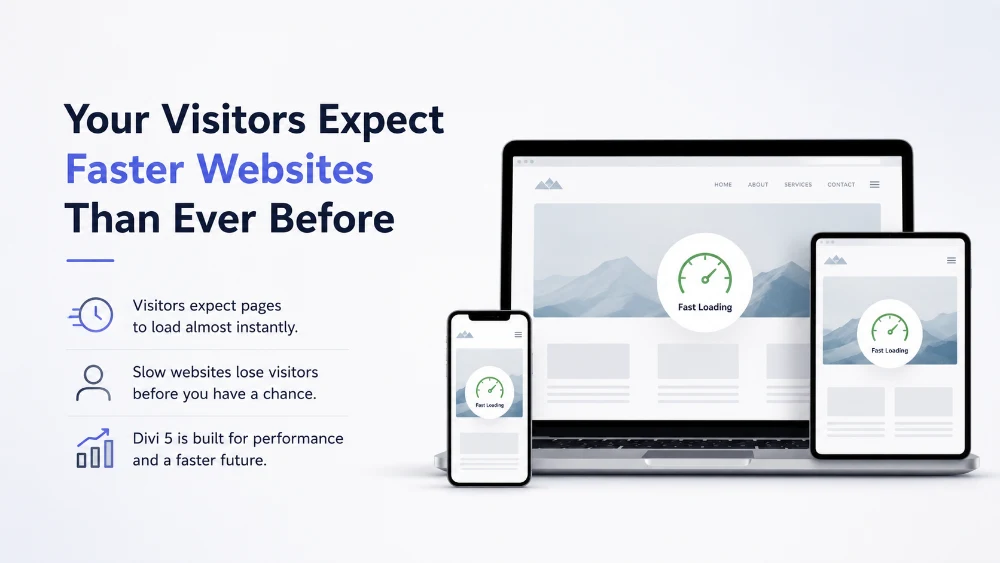
If a website feels slow, visitors often leave before they even see what you have to offer.
Google knows this.
Your customers know this.
And your competitors certainly know this.
One of the biggest goals behind Divi 5 was improving performance at the foundation level. The new architecture has been designed to produce cleaner code, reduce unnecessary processing, and create a faster overall experience.
While every website is different, many site owners are looking at Divi 5 as an opportunity to improve website speed while preparing for the future.
Better Performance Often Leads to Better SEO
A common misconception is that upgrading to Divi 5 will suddenly make a website rank #1 in Google.
Unfortunately, SEO isn’t that simple.
However, website performance plays an increasingly important role in modern search rankings.
Google continues to emphasize factors such as:
- Page speed
- Mobile usability
- User experience
- Core Web Vitals
Divi 5 helps create a stronger technical foundation by generating cleaner code and improving overall efficiency.
Think of it this way:
A race car driver still needs skill to win the race, but having a better car certainly helps.
The same is true for SEO.
Great content will always matter most, but a faster and more efficient website gives that content a better chance to succeed.
The Longer You Wait, The More Complex Migration Can Become
This is something many website owners don’t think about until it’s too late.
Every year your website grows.
You add:
- New pages
- New plugins
- New integrations
- New custom code
- New marketing tools
Over time, your website becomes more valuable—but it also becomes more complex.
The longer a migration is postponed, the more moving parts there are to evaluate and test later.
That’s one reason many businesses are choosing to upgrade while their websites are still manageable rather than waiting until years of additional complexity accumulate. In many cases, migrating sooner actually reduces long-term costs and risks. If you’re still evaluating whether Divi 5 is the right choice for your long-term needs, see our Divi 5 vs Elementor comparison.
Understanding the Difference Between Divi 4 and Divi 5
One of the most common questions we hear is:
“Is Divi 5 really that different from Divi 4?”
The short answer is yes.
But not necessarily in the way most people think.
When many people hear about a new version of Divi, they expect a few new modules, some design options, and maybe a handful of quality-of-life improvements.
Divi 5 is much bigger than that.
Instead of simply adding more features on top of the existing system, Elegant Themes made the bold decision to rebuild Divi’s foundation from the ground up.
Most visitors will never see this architectural change directly.
However, they will notice the results.
Divi 4 Helped Build Millions of Websites
To be clear, Divi 4 has been incredibly successful.
Millions of websites have been built with it.
Businesses have generated leads.
Online stores have processed sales.
Agencies have built entire businesses around it.
Divi 4 wasn’t broken.
The challenge was that the modern web evolved faster than the original architecture.
Website owners now expect:
- Faster page loading
- Better mobile experiences
- Improved accessibility
- Cleaner code output
- More advanced layouts
- Better scalability
Meeting those expectations required more than incremental updates.
It required a complete rebuild.
Divi 5 Was Designed for the Future
Rather than patching older systems indefinitely, Divi 5 introduces a modern architecture designed to support the next generation of WordPress websites.
This affects nearly every aspect of the platform.
Better Performance
Performance isn’t just about speed scores.
A faster website often creates:
- Better user experiences
- More page views
- Higher engagement
- More conversions
- Lower bounce rates
Divi 5 was designed with performance as a core priority rather than an afterthought.
More Design Flexibility
Modern web design continues to evolve.
Website owners increasingly expect layouts that go beyond simple rows and columns.
With features like CSS Grid support and improved layout controls, Divi 5 provides significantly more flexibility for creating advanced designs without relying on complex workarounds.
Easier Long-Term Maintenance
One of the less glamorous—but incredibly important—benefits of Divi 5 is maintainability.
Cleaner architecture makes it easier to:
- Troubleshoot issues
- Support future updates
- Build custom solutions
- Scale larger websites
While this may not sound exciting, it’s something agencies and business owners appreciate over the lifetime of a website.
Built for Growth
Perhaps the biggest difference between Divi 4 and Divi 5 is that Divi 5 was designed with the future in mind.
It’s not simply another update.
It’s the foundation that future Divi innovations will be built upon.
For many website owners, that’s the strongest reason to migrate.
Why DIY Divi 5 Migration Can Become More Expensive Than Expected
At first glance, upgrading from Divi 4 to Divi 5 can seem like a simple task.
Many website owners assume it’s just a matter of updating the theme, checking a few pages, and moving on.
And to be fair, for very small websites with minimal customization, that may be true.
The challenge is that most business websites are no longer simple.
Over the years, websites naturally grow. New pages get added. Plugins are installed. Custom CSS accumulates. Marketing tools are integrated. WooCommerce stores expand. Before long, what started as a simple website becomes a complex business asset with dozens of interconnected components.
This is where migration becomes less about clicking an update button and more about quality assurance.
The migration itself may only take a short time. The real work begins afterward when every important part of the website needs to be reviewed and tested.
For example, a typical business website often includes:
| Website Component | Why It Needs Testing After Migration |
|---|---|
| Homepage | Ensures layouts, hero sections, buttons, and branding remain intact |
| About Page | Verifies custom layouts and content formatting |
| Service Pages | Confirms calls-to-action, forms, and design consistency |
| Contact Forms | Ensures inquiries are still delivered correctly |
| Blog Templates | Checks post layouts, featured images, and typography |
| Header & Navigation | Confirms menus, dropdowns, and mobile navigation work properly |
| Footer | Verifies links, widgets, and contact information |
| Popups & Lead Magnets | Tests conversion elements and integrations |
| WooCommerce Pages | Reviews product pages, cart functionality, and checkout flow |
| Dynamic Content | Ensures custom fields and automated content display correctly |
Now consider that every one of these elements should be tested across multiple devices and screen sizes.
| Device Type | What Should Be Verified |
|---|---|
| Desktop | Full layout, navigation, forms, and interactive elements |
| Tablet | Responsive spacing, typography, and usability |
| Mobile | User experience, mobile menus, buttons, and conversion paths |
Suddenly, what seemed like a simple upgrade becomes a detailed review process involving dozens—or even hundreds—of individual checks.
One overlooked issue can create real business problems.
For example:
- A contact form stops sending leads.
- A WooCommerce checkout button becomes inaccessible on mobile.
- A custom CSS rule breaks the layout on tablets.
- A popup used for lead generation no longer appears.
- An SVG logo disappears from the header.
- Product pages display incorrectly after migration.
The most frustrating part is that these issues often go unnoticed until a customer reports them or sales begin to decline.
That’s why professional Divi 5 migration isn’t really about performing the upgrade itself. It’s about making sure everything continues working exactly as expected after the upgrade is complete.
Our goal is simple: help you enjoy the benefits of Divi 5 without the stress of discovering problems after your website goes live.
Our Divi 5 Migration Process
Migrating a website to Divi 5 isn’t something we rush. Every website has its own unique setup, customizations, plugins, and business requirements. That’s why we follow a structured migration process designed to minimize risk while ensuring your website takes full advantage of Divi 5’s new architecture.
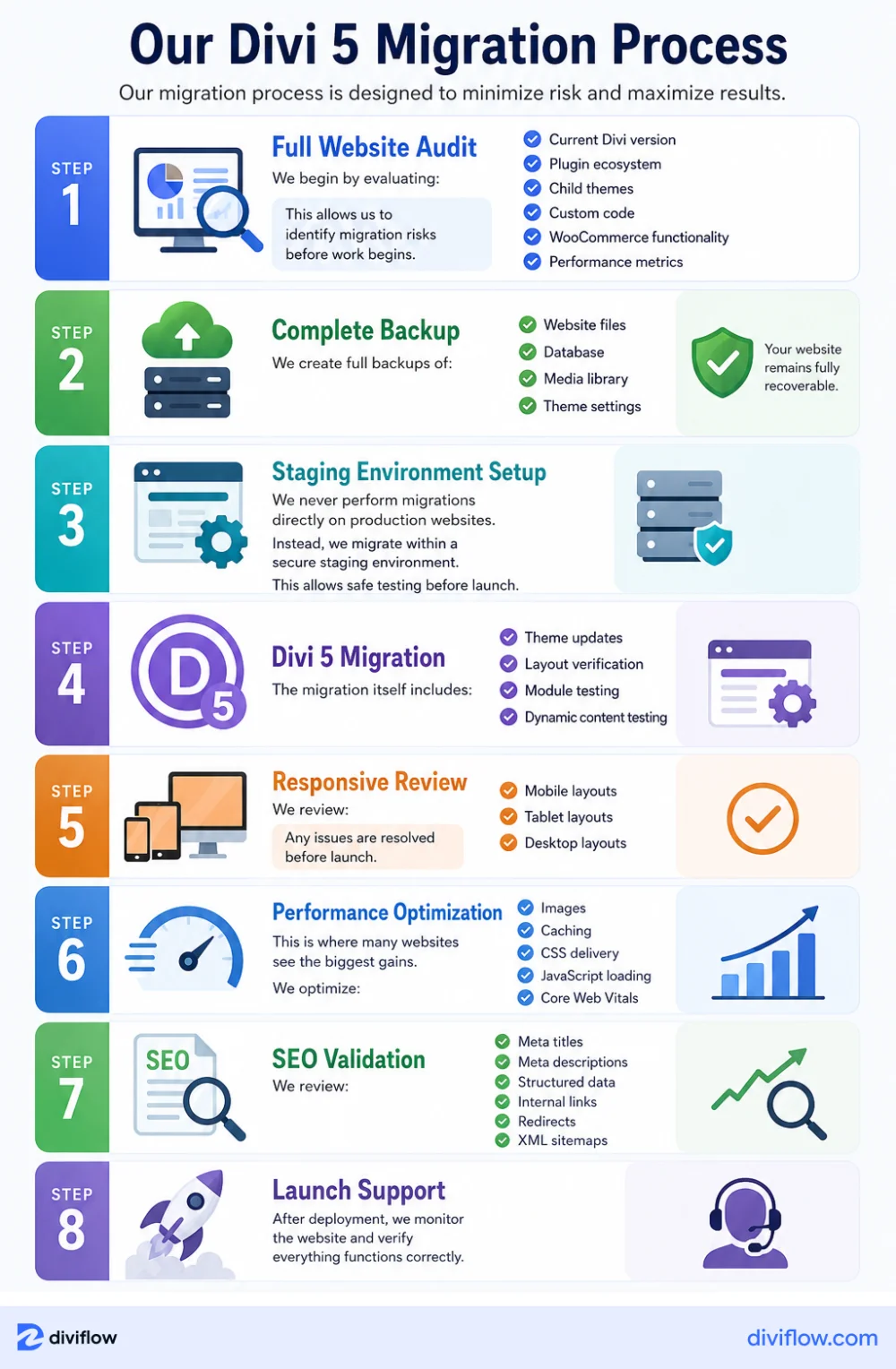
Step 1: Full Website Audit
Every successful migration starts with understanding the website we’re working with. Before making any changes, we perform a comprehensive audit of your existing website. We review your current Divi version, installed plugins, custom code, child theme configurations, WooCommerce functionality, and overall site architecture. We also analyze website performance and identify any existing issues that could affect the migration process. This initial assessment helps us uncover potential compatibility concerns early and allows us to create a migration strategy tailored specifically to your website.
Step 2: Complete Backup and Recovery Preparation
Before touching a single file, we create a complete backup of your website. This includes website files, databases, media assets, theme settings, and critical configuration data. Having a full backup ensures that your website remains fully recoverable throughout the entire migration process. While problems are rare, we believe every professional migration should have a reliable recovery plan in place.
Step 3: Secure Staging Environment Setup
One of the biggest mistakes website owners make is upgrading directly on a live website. We never do that. Instead, we create a secure staging environment that acts as a clone of your production website. This allows us to perform the Divi 5 migration, test functionality, and resolve issues without impacting your visitors, customers, or search engine rankings. Your live website continues operating normally while we complete the migration behind the scenes.
Step 4: Divi 5 Migration and Compatibility Testing
Once the staging environment is prepared, we begin the actual migration process. During this phase, we upgrade the website to Divi 5, verify layouts, test modules, review dynamic content, and validate custom functionality. We pay special attention to custom CSS, third-party Divi extensions, WooCommerce templates, and any advanced features that could be affected by the new architecture. Our goal is to ensure your website looks and functions exactly as expected before it ever goes live.
Step 5: Responsive Design Review
A website that looks great on desktop isn’t enough anymore. Modern websites must perform flawlessly across all devices. After migration, we carefully review key pages on desktop, tablet, and mobile devices. We check layouts, typography, spacing, navigation menus, forms, buttons, and conversion elements to ensure a consistent user experience across every screen size. Any responsive issues discovered during testing are resolved before launch.
Step 6: Performance Optimization
One of the biggest benefits of upgrading to Divi 5 is improved performance potential. Once the migration is complete, we focus on optimizing your website for speed and user experience. Depending on the project, this may include image optimization, caching improvements, CSS and JavaScript optimization, asset cleanup, and Core Web Vitals enhancements. The goal isn’t just to migrate your website but to leave it performing better than before.
Step 7: SEO Validation and Technical Review
Protecting your existing search visibility is a critical part of every migration project. We review important SEO elements including page titles, meta descriptions, structured data, internal links, redirects, canonical settings, and XML sitemaps. This validation process helps ensure that search engines can continue crawling and indexing your website properly after launch.
Step 8: Launch and Post-Migration Monitoring
Once everything has been tested, optimized, and approved, we carefully deploy the migrated website to your live environment. But our work doesn’t stop there. We continue monitoring the website after launch to verify functionality, identify any unexpected issues, and ensure the migration was successful. This final quality assurance phase provides peace of mind and helps ensure a smooth transition to Divi 5.
By following a structured migration process, we’re able to reduce risk, preserve website functionality, and help our clients take advantage of Divi 5’s performance improvements without the stress and uncertainty that often come with major website upgrades.
Divi 5 Migration for WooCommerce Stores
WooCommerce websites require specialized migration planning.
Online stores often contain:
- Custom product templates
- Checkout customizations
- Dynamic pricing systems
- Inventory integrations
- Membership functionality
A broken checkout can immediately impact revenue. For guidance on building and optimizing WooCommerce stores with Divi 5, check out our WooCommerce store guide.
Our WooCommerce migration process includes:
- Product page testing
- Cart testing
- Checkout testing
- Mobile commerce testing
- Payment gateway validation
Divi 5 Migration for Agencies
Agencies often manage dozens or hundreds of Divi websites.
Migrating client websites requires:
- Predictable workflows
- Minimal downtime
- Reliable testing procedures
We work with agencies to create scalable migration strategies that reduce risk across multiple websites.
Divi 5 Migration for Business Websites
Business websites often depend heavily on lead generation.
Even minor migration issues can affect:
- Contact forms
- Bookings
- Calls
- Sales inquiries
We verify all conversion points before launch.
Performance Improvements You Can Expect After a Divi 5 Migration
For many website owners, performance is the primary reason to consider upgrading to Divi 5.
Over the years, we’ve worked with business websites that slowly became heavier and more difficult to maintain. New plugins were added, customizations accumulated, and page builders became more demanding. Eventually, website owners start noticing the symptoms:
- Pages take longer to load
- Mobile users leave quickly
- Google PageSpeed scores decline
- Marketing campaigns convert less effectively
- Website management becomes frustrating
This is where Divi 5’s rebuilt architecture can make a meaningful difference.
While every website is unique and results vary depending on hosting, plugins, images, and overall site configuration, Divi 5 was specifically designed with performance in mind. For a detailed breakdown of the performance improvements, see our Divi 5 performance optimization guide.
Faster Loading Pages Create Better First Impressions
First impressions happen incredibly fast online.
Most visitors decide within a few seconds whether they want to continue exploring a website or leave.
A slow-loading homepage, service page, or landing page can cause potential customers to abandon your website before they even see what you offer.
By improving code efficiency and reducing unnecessary overhead, Divi 5 helps create a smoother browsing experience for visitors.
This means:
- Faster page rendering
- Less waiting
- Better user engagement
- More opportunities to convert visitors into customers
In competitive industries, even small speed improvements can have a measurable impact on business results.
Better Core Web Vitals and Technical SEO Performance
Google has made it clear that user experience matters.
Core Web Vitals are a set of performance metrics that measure how quickly and smoothly users can interact with your website.
These metrics evaluate factors such as:
- Loading performance
- Visual stability
- User interaction responsiveness
While Core Web Vitals are only one part of SEO, they help search engines understand whether users are having a positive experience on your website. Divi 5’s modern architecture helps create a stronger foundation for achieving better performance scores and maintaining a healthier technical SEO profile. For detailed optimization strategies, see our Divi 5 performance guide.
A Better Experience for Mobile Visitors
For many businesses today, more than half of website traffic comes from mobile devices.
That means your website isn’t being viewed primarily on large desktop monitors anymore. It’s being viewed on phones, tablets, and smaller screens where performance matters even more.
A slow or poorly optimized mobile experience can lead to:
- Higher bounce rates
- Lower engagement
- Fewer inquiries
- Lost sales opportunities
Divi 5 introduces improved responsive controls and modern layout capabilities that help create more consistent experiences across all devices.
The result is a website that feels more polished, professional, and user-friendly regardless of screen size.
Higher Conversion Potential
At the end of the day, website performance isn’t just about technical scores.
It’s about business results.
A faster website can help remove friction from the customer journey.
When visitors can quickly access information, browse products, complete forms, or move through checkout processes without delays, they’re more likely to take action.
Depending on your website goals, improved performance may contribute to:
- More contact form submissions
- More consultation requests
- More product sales
- Better lead generation
- Increased user engagement
- Lower bounce rates
While no migration can guarantee higher conversions on its own, improving website speed and user experience often creates a stronger environment for conversion optimization.
Lower Maintenance Costs Over Time
One benefit that’s often overlooked is the long-term maintenance advantage of Divi 5.
Because the platform has been rebuilt with a more modern architecture, future updates and enhancements are expected to be easier to manage compared to maintaining an aging website on older technology.
For business owners, this means fewer headaches, reduced technical debt, and a stronger foundation for future growth.
Instead of constantly patching and working around limitations, you can focus on growing your business while your website remains prepared for future WordPress and Divi developments.
Why Hire Divi Flow as Your Divi 5 Migration Expert?
Many WordPress developers understand WordPress.
Far fewer truly understand Divi.
Our focus on Divi allows us to identify migration issues that general developers often overlook.
We understand:
- Divi Builder
- Divi Theme Builder
- Divi Responsive Controls
- Divi WooCommerce Modules
- Divi Performance Optimization
- Divi SEO Best Practices
Most importantly, we understand how to protect business-critical websites during migration.
Frequently Asked Questions
What is a Divi 5 Migration Expert?
A Divi 5 Migration Expert specializes in safely upgrading websites from older Divi versions to Divi 5 while preserving design, functionality, SEO, and performance.
Is Divi 5 faster than Divi 4?
Yes. Divi 5 introduces a modern rendering engine, improved asset loading, and cleaner code output that can significantly improve website performance.
Can I upgrade Divi 4 to Divi 5 myself?
Yes, but websites with custom CSS, WooCommerce integrations, child themes, or third-party Divi plugins should be tested carefully before upgrading.
Will migration affect my SEO rankings?
A properly managed migration should preserve your SEO foundation. We validate technical SEO settings before launch.
How long does a Divi 5 migration take?
Most websites can be migrated within several days, while larger websites may require additional testing and optimization.
Do you migrate WooCommerce stores?
Yes. We provide specialized Divi WooCommerce migration services.
Will my custom CSS still work?
Most custom CSS continues working, but some code may require updates due to architectural changes in Divi 5.
What happens if something goes wrong?
We maintain complete backups and staging environments, ensuring a recovery path throughout the migration process.
How much does Divi 5 migration cost?
Pricing depends on website complexity, integrations, customizations, and testing requirements.
Do you optimize performance after migration?
Absolutely. Performance optimization is one of the primary benefits of migrating to Divi 5.
Get a Free Divi 5 Migration Assessment
Not sure whether your website is ready for Divi 5?
Our team will review your website, identify migration challenges, evaluate performance improvement opportunities, and provide a clear roadmap for upgrading to Divi 5 safely.
No pressure. No obligation.
Just practical advice from experienced Divi professionals who work with Divi websites every day.
Ready to find out if your website is prepared for Divi 5?
Contact Divi Flow today and discover the safest, smartest way to migrate your website to Divi 5.
About the Author

MD Nurullah
MD Nurullah is a web developer and content creator at DiviFlow, focused on building modern websites and creating helpful resources for the WordPress community.